Take the tour
Follow a student through Mighty Mathletes, then see what their teacher or parent sees. Tap the numbers on each screen.
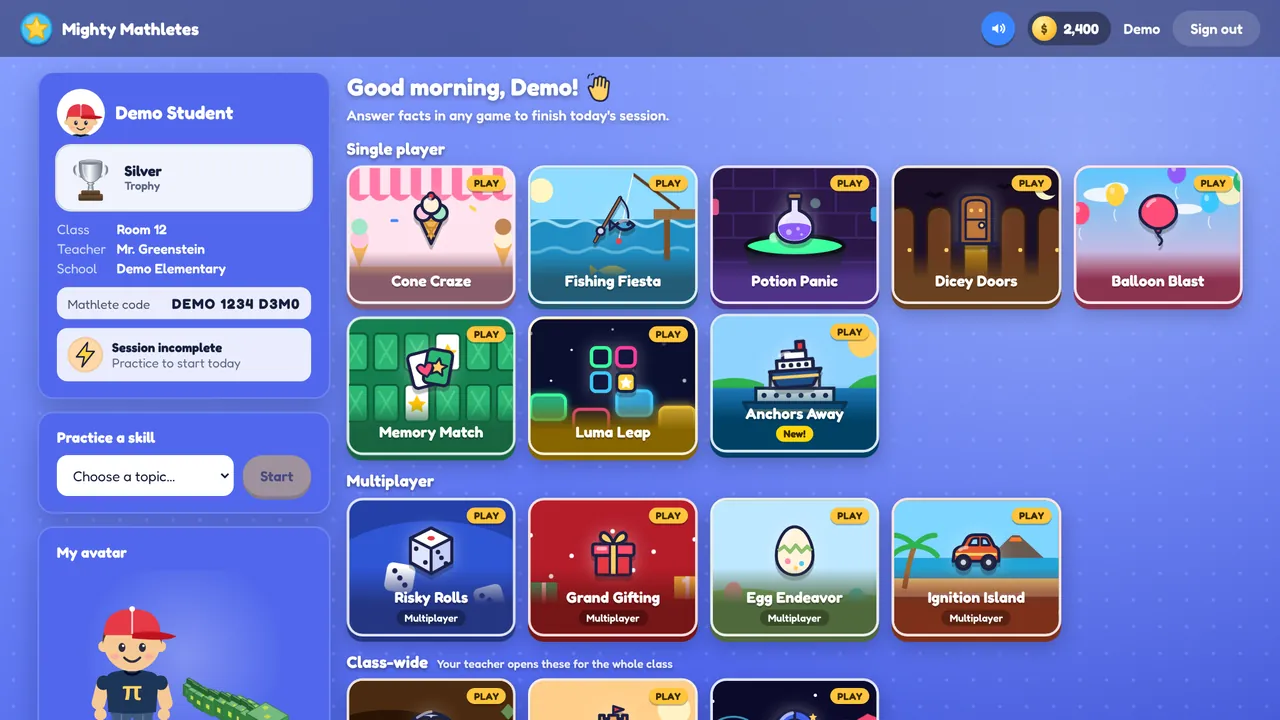
Everything starts in the lobby
Students sign in with a 12-character Mathlete code (no email, no password to forget) and land here.
- Their profileName, trophy, class, teacher and their Mathlete code.
- Today’s sessionAnswering facts in any game counts toward finishing today’s practice session.
- Single-player gamesEight games. Teachers and parents choose which ones are turned on.
- MultiplayerFour live games with classmates, or with computer players when no one else is around.
- Class-wide gamesThree games the teacher opens for the whole class at once.
- Practice a skillOpens a step-by-step lesson for any skill, from addition to long division.
Want to see it with your own class?
We’ll walk you through it with your grade level and schedule in mind.